Field guide · Underwater color
Why Underwater Photos Look Blue (and How to Get the Color Back)
Water absorbs warm light with depth, which is why underwater photos turn blue or green. Here is what happens, and how to restore natural color.
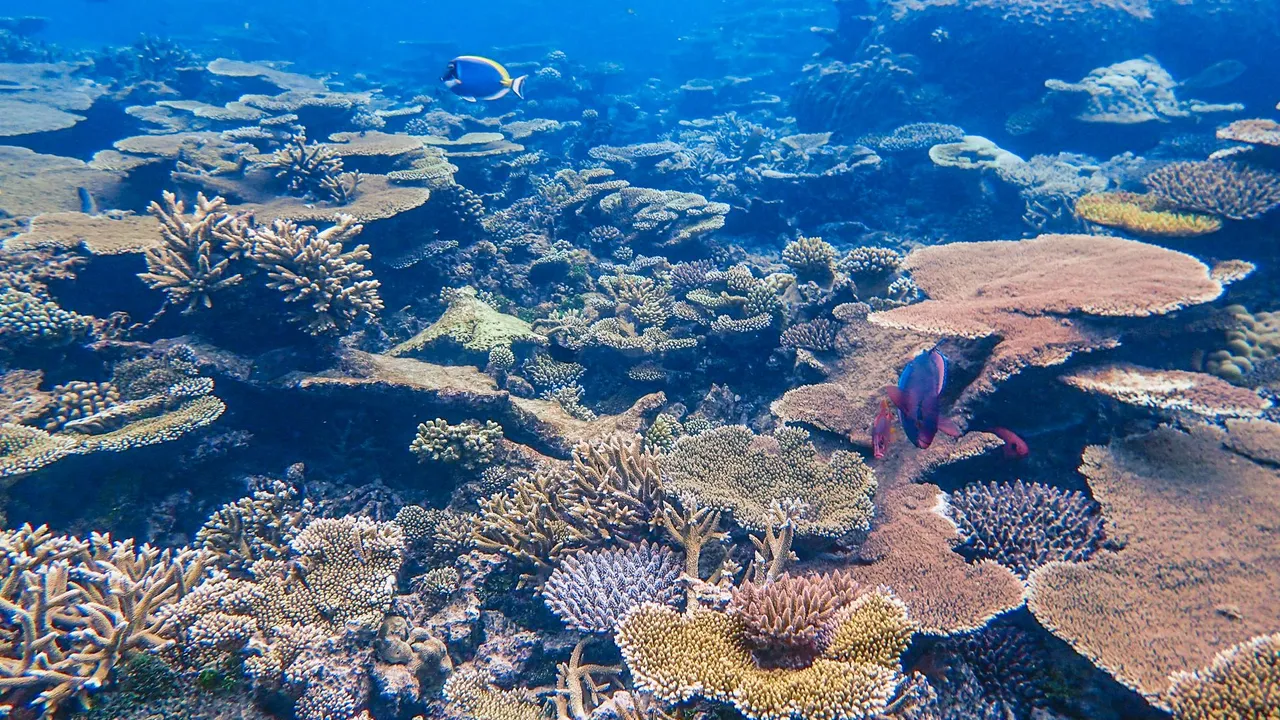
Almost every diver comes back with the same disappointment. The reef was saturated with color in person — the yellow of a butterflyfish, the red of a sea fan — and then the photos come back flat, blue-grey, and lifeless. It is easy to blame the camera, but the camera is mostly doing its job. Water rewrites light on the way down, and it does most of the damage before that light ever reaches your sensor.
Here is what is actually happening, why the cast is sometimes blue and sometimes green, why your camera cannot simply correct it, and what does bring the color back — both in the water and afterward.
Water absorbs color with depth
Sunlight arriving at the surface is a full mix of wavelengths, from long-wavelength red through to short-wavelength blue. Water does not absorb those wavelengths evenly. The long ones go first. It is the same absorption described by the Beer–Lambert law: the further light travels through water, the more of it is lost, and the warm end of the spectrum disappears fastest.
As a rough guide in clear tropical water:
- Red begins dropping off within the first few meters and is mostly gone by about 5 meters (15 feet).
- Orange fades out by around 10 meters.
- Yellow weakens noticeably past roughly 20 meters.
- Green holds on longer, and blue keeps traveling well beyond 60 meters.
That is why everything trends blue the deeper you go — blue is simply the light that survives.
The part many divers miss is that this is about total distance through water, not just depth. A subject three meters below you keeps far more of its color than the same subject photographed across ten meters of water horizontally. Two shots at the same depth can look completely different depending on how much water sits between your lens and the subject. Getting close is the single most useful habit underwater, and it is the reason wide-angle shooters push right up to their subjects.
Blue water versus green water
Not every underwater cast is blue. Open ocean tends toward deep blue because there is very little suspended in it to interfere with the light — oceanographers class the clearest of this water as Jerlov Type I. Coastal and tropical sites often skew green instead, because plankton, dissolved organic matter, and fine sediment absorb and scatter light differently.
Those same particles cause a second problem: backscatter. That is light bouncing off matter suspended in the water, which lowers contrast and lays a hazy veil over the image. Backscatter is the other half of why underwater photos look dull, working alongside color loss. Neither a blue cast nor a green one is “wrong” — they just tell you which direction you will be correcting, and how much haze you are fighting.
Why your camera cannot simply fix it
A camera can only record light that actually reaches it. If the red wavelengths were absorbed by ten meters of water, there is very little red information in the file to begin with — the sensor never received it. Automatic white balance tries to compensate by boosting the channels that look weak, but past a certain depth it is amplifying a signal that is barely there. That is why deep shots often turn magenta, muddy, or blotchy when the camera or an editor pushes them too far: there is nothing left in that channel to stretch cleanly.
Shooting RAW helps, because it preserves the maximum amount of color information and gives you the most room to correct later. But RAW is not a rescue. It keeps what the sensor captured; it cannot restore a channel that arrived empty.
Getting color back in the water
There are two honest ways to recover color while you are still shooting, and they work best together.
Add your own light. A strobe or a video light held close to the subject puts full-spectrum light onto it before the water has a chance to filter anything out. It is the most reliable fix, and it is essential for macro and close-up work where you want accurate reds and true tones on a creature. Keep the light off the column of water directly between your lens and the subject, or you will light up the particles and create backscatter.
Correct within the range where red survives. Red and magenta filters, used with natural light only, together with a manual or custom white balance, can restore a believable image in roughly the top 10 to 20 meters — the depths where some red is still present to work with. Set a custom white balance off a neutral surface at depth and the difference is immediate. One firm rule: never use a red filter together with a strobe. The strobe already provides full-spectrum light, so the filter just over-corrects and turns everything orange.
Technique comes first because it feeds everything downstream. A photo shot close, shallow, and well-lit gives every later editing step far more to work with. If you shoot an action camera, the fixed lens makes getting close even more important — and the specifics differ by model, which is why it is worth reading the notes for your rig, whether that is a GoPro or a DJI Osmo Action.
Where editing and AI come in
Editing rebalances the shift that the water introduced. By hand, that usually means setting white balance off a neutral point, lifting the reds and warm tones back up, pulling down the excess cyan, and adding contrast or dehaze to cut through backscatter. It is a real skill, and white balance is where every underwater edit begins.
Depth-aware tools take a different route: they model how water absorbs color across the frame and rebuild a natural-looking result in one step, instead of asking you to move a dozen sliders. That is the approach our app JellyFix takes — it estimates the depth-related color shift and reconstructs the image automatically. If you want to see how a one-step tool compares to working the sliders in an editor, that trade-off is covered in our guide to the best underwater photo editor.
Whichever route you take, the same limit applies, and it is worth repeating: software works with the information that was captured. If some red survived, it can be amplified and rebalanced convincingly, and the result looks like what you remember. If a channel is genuinely empty, no tool — AI included — can invent detail that was never recorded. That is exactly why shooting shallow and close matters even when you have good software, and it is the honest version of what “restore underwater photos” can and cannot mean. There is a full walkthrough in how to restore underwater photos, with real before-and-after examples in the gallery.
Field checklist
- Get close to your subject to cut down the amount of water the light has to travel through.
- Shoot shallower when you want real color from natural light.
- Use a strobe or video light for macro and for anything below the range where red survives.
- Shoot RAW so you keep the most color information for editing.
- Use a red filter with ambient light only — never together with a strobe.
- Match your white balance to the water: bluer offshore, greener inshore.
Do that consistently, and the color you saw on the dive is mostly still there in the file — waiting to be brought back rather than invented from nothing.
Field notes
Frequently asked questions
Why do underwater photos look blue?
At what depth does red disappear underwater?
Why do some underwater photos look green instead of blue?
Can you fix the blue color in editing?
Do red filters fix underwater color?
Why do underwater photos lose red first?
Should I shoot RAW underwater?
Does a GoPro automatically correct underwater colors?
Can AI restore underwater photos?
Can old underwater photos be restored?
Underwater color science
Continue Learning
How to Restore Underwater Photos
Learn the different ways to restore natural underwater colors using white balance, editing software, and AI.
Read moreBest Underwater Photo Editor
Compare the most popular underwater editing tools and discover which workflow suits your diving style.
Read moreDJI Action Underwater Color Correction
Camera settings, shooting technique, and editing workflows for better color from DJI Action cameras.
Read moreGoPro Underwater Color Correction
Learn how to improve underwater photos taken with GoPro cameras.
Read more